11Views 0Comments
How to Store Crypto Offline: Ultimate Security Guide
The cryptocurrency landscape has transformed dramatically over the past decade, with institutional adoption reaching unprecedented levels and individual holdings growing into life-changing sums. Yet with this growth comes an alarming reality: over $3 billion in cryptocurrency was stolen in 2023 alone, while countless investors have lost access to their holdings permanently due to improper storage. The fundamental principle that makes cryptocurrency revolutionary—complete user control over their assets—becomes a double-edged sword when that control leads to catastrophic loss. Understanding how to store crypto offline isn’t merely an optional security measure; it’s an essential practice for anyone serious about protecting their digital wealth.
This guide provides a comprehensive roadmap to securing your cryptocurrency holdings through cold storage methods, from hardware wallets to paper wallets, with detailed implementation steps and expert-backed security protocols. Whether you’re holding your first $100 in Bitcoin or managing a seven-figure portfolio, the strategies outlined here will help you achieve military-grade protection for your digital assets.
Understanding Cold Storage: Why Offline Matters
Cold storage refers to any method of keeping cryptocurrency private keys completely disconnected from internet-connected devices. When your keys exist only in analog form or on air-gapped hardware, hackers cannot reach them through remote attacks, phishing schemes, or malware. This fundamental isolation creates what security professionals call an “attack surface reduction”—the fewer pathways enemies have to your keys, the safer your assets become.
The necessity of cold storage becomes clear when examining how cryptocurrency theft actually occurs. According to the 2024 Crypto Crime Report published by Chainalysis, ransomware attacks alone netted criminals over $1.1 billion in 2023, while exchange hacks continue to drain billions more from poorly secured hot wallets. When you store your crypto on an exchange or even on an internet-connected software wallet, you depend on that platform’s security measures—security that has repeatedly proven insufficient.
Key Insights
– Cold storage eliminates remote theft vectors entirely
– Your keys exist only in your physical possession
– Even if your computer is compromised, offline assets remain secure
Jameson Lopp, a prominent Bitcoin security researcher and co-founder of CasaHodl, emphasizes this distinction: “The beautiful thing about cold storage is that it forces attackers to physically target you rather than simply hacking a server from anywhere in the world.” This physical limitation dramatically raises the cost and difficulty of theft, making cold storage the gold standard for serious cryptocurrency holders.
Types of Hardware Wallets: Finding Your Best Fit
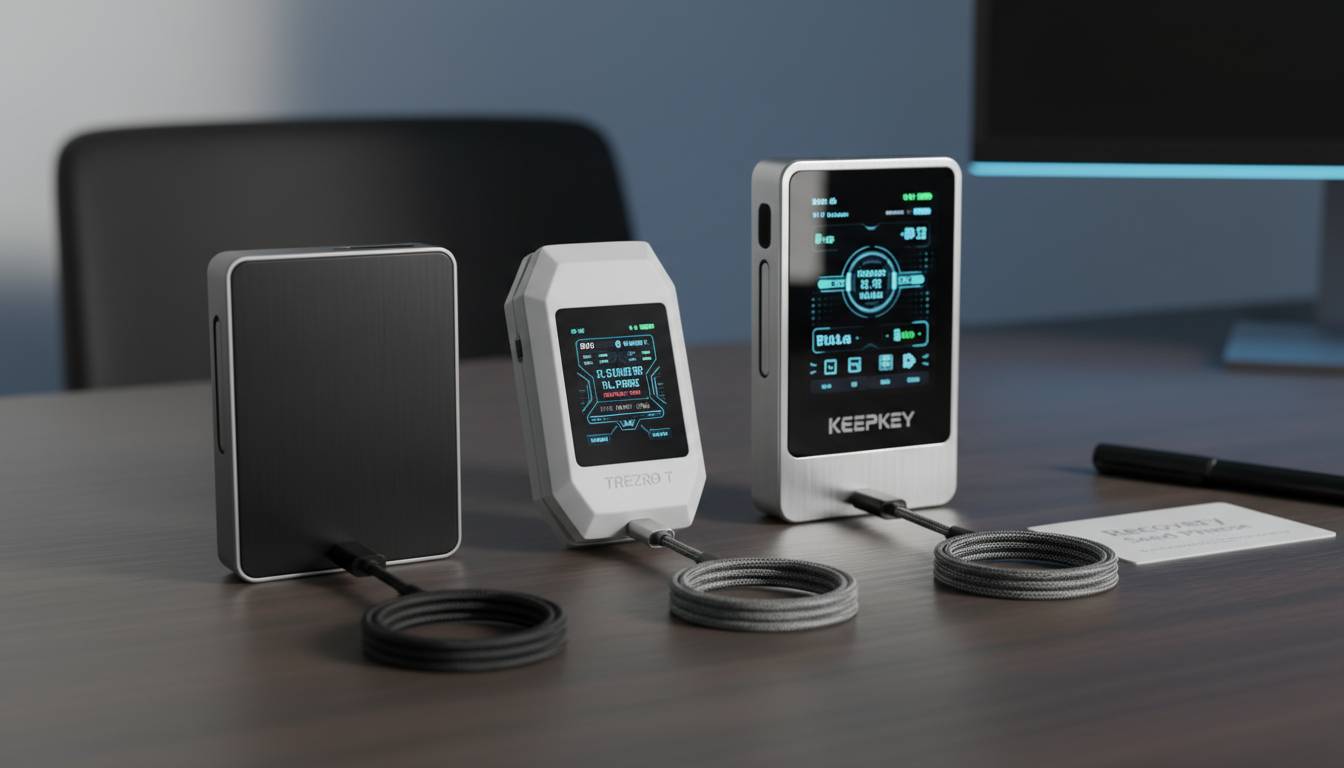
Hardware wallets represent the most popular cold storage solution, combining robust security with relative usability. These devices store your private keys on specialized secure elements—essentially mini-computers designed specifically to protect cryptographic keys. When you need to sign a transaction, the device handles all critical operations internally, ensuring your keys never leave the protected environment.
Leading Hardware Wallet Options
| Wallet | Price | Security Rating | Supported Assets | Best For |
|---|---|---|---|---|
| Ledger Nano X | $149 | ⭐⭐⭐⭐⭐ | 5,500+ | Mobile users, multi-chain holders |
| Trezor Model T | $239 | ⭐⭐⭐⭐⭐ | 1,000+ | Maximum open-source transparency |
| Ledger Nano S Plus | $79 | ⭐⭐⭐⭐ | 5,500+ | Budget-conscious users |
| COLDCARD Mk4 | $189 | ⭐⭐⭐⭐⭐ | Bitcoin-only purists | Advanced security features |
| Shift Crypto BitBox02 | $139 | ⭐⭐⭐⭐ | 100+ | European users,简洁 design |
The Ledger Nano X dominates market share due to its Bluetooth capability and extensive asset support, though this wireless feature has drawn criticism from purists who argue it introduces unnecessary attack vectors. The Trezor Model T, produced by Czech company SatoshiLabs, maintains a reputation for open-source firmware that independent researchers can audit—a transparency commitment many security-conscious users prefer.
For Bitcoin maximalists, the COLDCARD wallet offers specialized features including a dedicated Bitcoin-only operating system and physical confirmation buttons that make remote signing attacks theoretically impossible. Andreas Antonopoulos, renowned Bitcoin educator and author of “Mastering Bitcoin,” frequently advocates for Bitcoin-specific hardware wallets in security-sensitive contexts, arguing that simplicity reduces the attack surface.
When choosing a hardware wallet, prioritize:
– Open-source software allowing community security audits
– Secure element chip technology
– Recovery seed compatibility with standard BIP-39 wordlists
– Physical buttons for transaction confirmation
Paper Wallets: The Ultimate Cold Storage?
A paper wallet represents the simplest form of cold storage—your private keys and public addresses printed on paper, entirely disconnected from any electronic device. When generated correctly using secure, air-gapped computers, paper wallets offer theoretical immunity to digital attacks. No malware can reach keys that exist only as ink on paper.
However, paper wallets carry significant drawbacks that make them unsuitable for most users. The physical nature of paper creates vulnerability to fire, water damage, deterioration, and simple loss. Additionally, the process of generating paper wallets has historically been where many users made catastrophic security errors, using online generators that captured their keys or creating keys with insufficient randomness.
Paper Wallet Security Requirements
– Generation on a computer that has never connected to the internet
– Use of verified, open-source key generation software
– Printing with a dedicated, offline printer
– Physical storage in a secure, fireproof location
– Multiple copies stored in separate geographic locations
If you still choose to use paper wallets, limit them to long-term Bitcoin storage where you anticipate no transactions for years. For any actively-managed portfolio, hardware wallets provide superior convenience without meaningful security sacrifices.
Setting Up Your Hardware Wallet: Step-by-Step
Proper hardware wallet setup requires attention to detail that borders on paranoia—and this paranoia is warranted. A single mistake during setup can compromise your entire holdings. Follow these steps meticulously, understanding that shortcuts today could mean losses tomorrow.
Prerequisites Before You Begin
Before unpacking your device, prepare a clean, secure environment. Close all unnecessary applications on your computer. Disable any screen sharing or remote desktop software. If possible, use a dedicated computer for this setup—one you don’t use for daily browsing. This computer should run updated, reputable security software.
You’ll need a secure location to record your recovery seed—typically a piece of paper or a metal recovery card. Never store your seed digitally. Never photograph it. Never type it into a computer. The seed is your ultimate backup, and any digital copy represents a potential theft vector.
The Setup Process
Step 1: Verify Package Integrity
Before connecting your device, inspect the packaging carefully. Look for signs of tampering, broken seals, or anything suggesting the device has been opened. Some hardware wallets include holographic stickers that reveal tampering attempts. If anything seems off, contact the manufacturer immediately and do not proceed.
Step 2: Initialize the Device
Connect your hardware wallet to your computer using the provided USB cable. Follow the on-screen prompts to initialize a new wallet. Create a PIN that is at least 8 digits—longer is better, but balance against usability. Avoid obvious sequences like “12345678” or repeated digits.
Step 3: Generate Your Recovery Seed
This is the critical moment. Your device will generate a 12 or 24-word recovery seed. Write each word in order, double-checking your spelling. Cross-reference against the word list provided by your wallet to ensure accuracy. One misspelled word could make recovery impossible.
Step 4: Verify Your Seed
Most quality hardware wallets will ask you to verify your seed by selecting specific words in order. This isn’t redundant; it confirms you recorded everything correctly. Complete this verification without exception.
Step 5: Install Software
Download the official wallet software from the manufacturer’s website—never from links in emails or third-party sources. Verify the URL carefully. Install the software and configure it to work with your hardware wallet.
Security Best Practices: Protecting Your Cold Storage
Acquiring a hardware wallet is only the beginning. Ongoing security practices determine whether your cold storage actually protects your assets. Many thefts occur not through technical wallet compromise but through human error, social engineering, or physical threats.
Seed Phrase Security
Your recovery seed phrase represents absolute control over your cryptocurrency. Anyone who obtains these words can recreate your wallet and transfer all funds. This makes seed phrase security your paramount concern.
Recommended Seed Storage Methods:
– Metal backup plates (cryptosteel, billfodl) that survive fires up to 1,400°C
– Bank safe deposit boxes in separate locations
– Home safes rated for fire and water resistance
-分散存储 across multiple secure locations
Pamela Morgan, author of ” Cryptocurrency Security: A Guide for Protecting Your Digital Assets,” advises: “Think of your seed phrase like the deed to your house—it’s useless to you if you can’t find it, but devastating if the wrong person obtains it. Plan your backup strategy accordingly.”
Operational Security
When signing transactions with your hardware wallet, verify all transaction details on the device screen before confirming. Hackers can manipulate transaction data on your computer, showing you one recipient while the device actually signs a transfer to a different address. This “address spoofing” attack has drained countless wallets. Your hardware wallet display is the only trustworthy source for transaction verification.
Never discuss your cryptocurrency holdings publicly, especially on social media. Armed robberies targeting crypto holders have increased dramatically, with criminals increasingly researching potential victims through public blockchain analysis and social media monitoring.
Common Mistakes to Avoid
Even experienced cryptocurrency holders make critical errors that jeopardize their cold storage security. Understanding these pitfalls helps you avoid them.
Mistake #1: Storing Seeds Digitally
Many users photograph their recovery seeds for “convenience,” not understanding this creates a permanent digital vulnerability. Malware can search for photos containing seed words. Cloud backups can be compromised. Digital seed storage defeats the entire purpose of cold storage.
Mistake #2: Purchasing Used Hardware Wallets
Never purchase hardware wallets from resale markets or auctions. Attackers have developed techniques to compromise devices, returning them to sale with modified firmware that transmits seeds when connected. Only buy directly from manufacturers or authorized resellers, verifying all packaging and serial numbers.
Mistake #3: Ignoring Firmware Updates
Hardware wallet manufacturers regularly release firmware updates that patch newly discovered vulnerabilities. While updating carries minimal risk, ignoring updates leaves known vulnerabilities unaddressed. Check for updates monthly, and verify update authenticity through official channels.
Mistake #4: Single Point of Failure
Storing your only recovery seed in one location creates catastrophic risk. House fires, natural disasters, or simple misplacement can permanently destroy your access.分散 your seeds across multiple locations while maintaining security.
Multi-Signature Storage: Advanced Protection
For holders managing significant cryptocurrency wealth, multi-signature (multisig) arrangements add additional security layers by requiring multiple keys to authorize transactions. Rather than one person holding a single seed, multisig distributes authorization across several parties or devices.
Multisig Configurations
| Setup | Required Keys | Total Keys | Best For |
|---|---|---|---|
| 2-of-3 | 2 | 3 | Business partners, family trusts |
| 3-of-5 | 3 | 5 | High-value personal holdings |
| 5-of-9 | 5 | 9 | Corporate treasuries |
With a 2-of-3 multisig setup, three keys are generated and distributed to different locations. Any two keys can authorize a transaction, meaning one key can be lost or stolen without funds being compromised. This configuration protects against both theft and accidental loss.
CasaHodl, founded by Jameson Lopp, specializes in multi-signature solutions for high-net-worth Bitcoin holders. Their infrastructure distributes keys geographically, requiring coordinated access for any transaction. For individuals holding life-changing sums, such arrangements provide protection that single-device solutions cannot match.
Conclusion
Securing cryptocurrency through cold storage represents an essential practice that evolves from optional precaution to absolute necessity as holdings grow. The methods outlined in this guide—hardware wallets, proper seed phrase management, multi-signature configurations—provide progressively stronger protection layers appropriate to different risk profiles and asset levels.
Start with a hardware wallet from a reputable manufacturer. Master the setup process. Create robust backup procedures. Remain vigilant about operational security throughout your holding period. Your cryptocurrency’s security ultimately depends on your commitment to these practices.
The cryptocurrency revolution has given individuals unprecedented control over their financial sovereignty. This freedom carries responsibility—responsibility to protect what you’ve earned through understanding and implementing proper security measures. Your future self will thank you for the attention you pay today.
Frequently Asked Questions
What is the safest way to store cryptocurrency for long-term holding?
Hardware wallets like Ledger or Trezor devices provide the best combination of security and usability for long-term storage. Generate your recovery seed on the device itself, store the seed in multiple secure locations (preferably metal backups), and keep your hardware wallet in a secure physical location. For holdings exceeding $100,000, consider multi-signature solutions.
Can paper wallets still be considered secure?
Paper wallets can be secure when generated correctly using offline computers and dedicated printers, but they carry significant risks including physical damage, loss, and user error during generation. Most security experts now recommend hardware wallets over paper wallets for most use cases due to hardware wallets’ superior balance of security and usability.
What happens if I lose my hardware wallet?
If you lose your hardware wallet, you can recover all funds using your recovery seed phrase (the 12 or 24 words you wrote during setup). Purchase a new hardware wallet from the same or compatible manufacturer, select the recovery option, and enter your seed words. Your cryptocurrency will be restored to the new device.
Should I tell my family about my cold storage setup?
Yes, you should ensure at least one trusted person knows how to access your cryptocurrency in case of emergency. Provide them with information about your storage method and location of backups, but never give them direct access to your seeds. Consider creating a detailed recovery plan that your family can follow if you’re incapacitated.
How often should I check my hardware wallet firmware for updates?
Check for firmware updates monthly, but only download updates from official manufacturer websites. Before updating, research the update in manufacturer forums or social channels to verify legitimacy. Some users prefer waiting several weeks after major updates to ensure no bugs are discovered by the broader community.
Is it safe to buy hardware wallets from Amazon or other marketplaces?
No. Purchasing hardware wallets from third-party marketplaces carries significant risk of device tampering. Always purchase directly from the manufacturer’s official website or authorized resellers. Verify all packaging and serial numbers upon delivery, and initialize any new device as if it might be compromised until you’ve verified its integrity.